
OLIVER › OLIVER Configuration
OLIVER Configuration – Configuration Software for IRD8800
On-Line Investigation of Vibration in Equipment and Rotary Machines
A Windows-based utility to view and amend the configuration of your IRD8800 Machinery Protection System – full scale, alarm and trip set points, sensor sensitivity and more – with password protection.
Request a QuoteBook a DemoWhatsApp +91-9082527331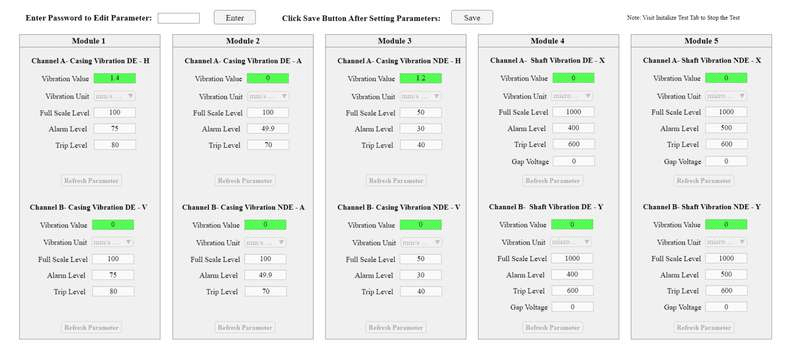
What OLIVER Configuration does
OLIVER Configuration is a Windows-based utility for viewing and amending the configuration of the IRD8800 Machinery Protection System. It is provided for the IRD8800, which connects to the utility over MODBUS RTU or MODBUS TCP. The utility then gives password-protected read and write access to the MODBUS registers that control the monitoring system.
What you can set per channel
- Vibration unit
- Full scale level
- Alarm set point
- Trip set point
- Sensor sensitivity, and gap voltage on shaft vibration channels
How it works
- Connect to the system over MODBUS RTU or MODBUS TCP
- Enter the password to edit parameters
- Change values for each module and channel
- Click Save to write them to the monitor
Connection
OLIVER Configuration works over MODBUS only (RTU or TCP). It is supplied for the IRD8800 Machinery Protection System.
Auto Recovery
If communication is lost – a loose or broken cable or any other reason – OLIVER retries the connection every 30 seconds for 10 attempts before alerting the user on screen. Both values can be customised.
Minimum PC requirements
The same PC specification applies to every OLIVER edition – Configuration, Basic, Advanced and Extreme.
- Windows 10 or later (Windows 11 preferred)
- Intel Core i5 12th Gen or higher (or AMD Ryzen 5)
- 8 GB RAM; integrated or external graphics
- 256 GB SSD or higher
- Min. 1920×1080, 15.6" or larger display
- Ethernet port, USB 2.0 or better, keyboard & mouse
- UPS power so background tasks keep running
Read more in our Help Center: System requirements – OLIVER Advanced → · Minimum system requirements – OLIVER Basic →
Upgrade to OLIVER Basic
OLIVER Basic builds on OLIVER Configuration. It keeps viewing and amending of configuration and adds custom dashboards, live colour-coded measurements, tabular data, live and historical trends, and export of data to Excel for reporting.
Upgrade to BasicCompare all editionsPrice on request
Every OLIVER installation is custom-built for the project, so prices are quoted by sales@irdmech.com.
Request a QuoteBook a DemoWhatsApp +91-9082527331