OLIVER – Online Vibration Monitoring & Diagnostics Software
On-Line Investigation of Vibration in Equipment and Rotary Machines
Live values, trends, analysis plots and fault diagnosis for your IRD online monitoring systems – custom-built for each project.
Request a QuoteBook a DemoWhatsApp +91-9082527331
What is OLIVER?
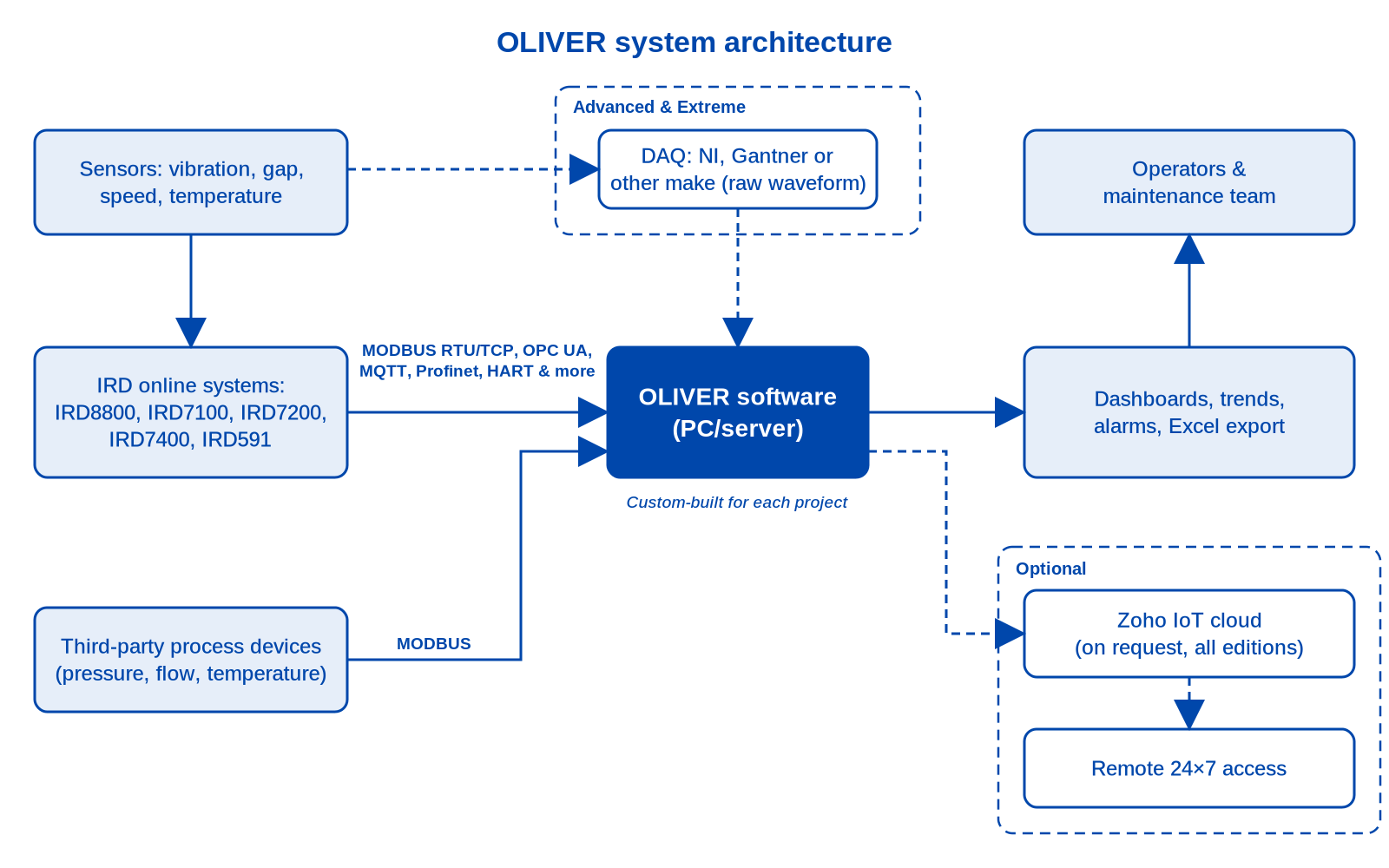
OLIVER is IRD's own software for online condition monitoring, developed in India and built on decades of IRD experience in vibration-based condition monitoring. Besides vibration it brings in speed, temperature, pressure, flow and other process values, and it talks the industrial protocols your plant already uses. Every OLIVER installation is custom-built to the project's channel count, screens and requirements.
Works with IRD online systems: IRD8800 MPS, IRD7100 MPT, IRD7200 MST, IRD7400 and IRD591 sensors, plus third-party devices over MODBUS.
How OLIVER fits your plant
Choose your edition
OLIVER Configuration
Entry level, for the IRD8800: password-protected viewing and amending of full scale, alarm and trip set points, sensor sensitivity and more over MODBUS RTU or TCP.
Explore ConfigurationOLIVER Basic
Everything in Configuration, plus live and historical values, trends, colour-coded alarms, Time-to-Alarm and Excel export.
Explore BasicOLIVER Advanced
Everything in Basic, plus raw-signal analysis: waveform, FFT, orbit, shaft centreline, Bode, Cascade, Waterfall and harmonic orders.
Explore AdvancedOLIVER Extreme
Everything in Advanced, plus automatic diagnosis of the most likely cause of high vibration and time-to-failure prediction.
Explore ExtremeEdition comparison
| Capability | Configuration | Basic | Advanced | Extreme |
|---|---|---|---|---|
| OLIVER Configuration: password-protected unit, full scale, alarm/trip set points, sensor sensitivity | ✔ | ✔ | ✔ | ✔ |
| Live values on a custom dashboard / machine mimic | ✗ | ✔ | ✔ | ✔ |
| Colour-coded thresholds and Time-to-Alarm | ✗ | ✔ | ✔ | ✔ |
| Live and historical values, tables and trends | ✗ | ✔ | ✔ | ✔ |
| Export of data to Excel | ✗ | ✔ | ✔ | ✔ |
| Protocols | MODBUS RTU / TCP | MODBUS RTU/TCP, OPC UA, MQTT, Profinet, HART and more | same as Basic | same as Basic |
| Zoho IoT cloud connection (on request) | ✗ | ✔ | ✔ | ✔ |
| Auto Recovery on communication loss | ✔ | ✔ | ✔ | ✔ |
| Live and static time waveform and FFT spectrum | ✗ | ✗ | ✔ | ✔ |
| Orbit and shaft centreline | ✗ | ✗ | ✔ | ✔ |
| Bode and Cascade (tachometer input needed) | ✗ | ✗ | ✔ | ✔ |
| Waterfall and harmonic orders | ✗ | ✗ | ✔ | ✔ |
| Plot export for reports and historical plot viewing | ✗ | ✗ | ✔ | ✔ |
| Needs DAQ hardware (NI, Gantner or other make) | ✗ | ✗ | ✔ | ✔ |
| Automatic diagnosis of the most likely cause | ✗ | ✗ | ✗ | ✔ |
| Time-to-failure prediction | ✗ | ✗ | ✗ | ✔ |
| Price | Request a Quote | |||
— = not stated in our documentation; ask us.
Key features

Customised dashboards
Live readings on a mimic of your machine, colour-coded against your alarm thresholds.

Live & historical trends
Follow every channel live and look back through stored history.

AVD spectrum
Acceleration, velocity and displacement spectra (Advanced and Extreme).

Orbit plot
Shaft orbit and waveform from proximity probes (Advanced and Extreme).

Parameter configuration
Configure IRD8800 settings remotely from the PC.
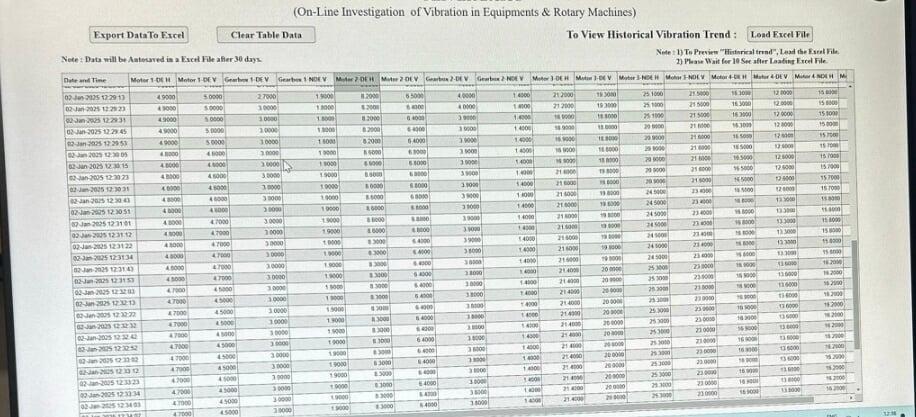
Export to Excel
Tabular live and historical data, exported to Excel in one click.
Protocols and connectivity
OLIVER Basic, Advanced and Extreme support MODBUS RTU and MODBUS TCP, OPC UA, MQTT, Profinet, HART and more; OLIVER Configuration works over MODBUS RTU / TCP only. On MODBUS RTU OLIVER handles up to 500 channels (depending on project size); on MODBUS TCP there is no channel limit. A connection to the Zoho IoT cloud is available on request for OLIVER Basic, Advanced and Extreme.
OLIVER Configuration
The entry-level edition and the base of every other OLIVER edition: a Windows utility to view and amend the settings of the IRD8800 Machinery Protection System – unit, full scale, alarm and trip set points, sensor sensitivity and more – with password protection, over MODBUS RTU or TCP.
Explore OLIVER ConfigurationSee OLIVER in action
IRD8800 Machinery Protection System – Live Demo with OLIVER Software
Minimum PC requirements
The same PC specification applies to every OLIVER edition – Configuration, Basic, Advanced and Extreme.
- Windows 10 or later (Windows 11 preferred)
- Intel Core i5 12th Gen or higher (or AMD Ryzen 5)
- 8 GB RAM; integrated or external graphics
- 256 GB SSD or higher
- Min. 1920×1080, 15.6" or larger display
- Ethernet port, USB 2.0 or better, keyboard & mouse
- UPS power so background tasks keep running
Read more in our Help Center: System requirements – OLIVER Advanced → · Minimum system requirements – OLIVER Basic →
Customers using OLIVER




Frequently asked questions
What does OLIVER stand for?
On-Line Investigation of Vibration in Equipment and Rotary Machines.
Which edition do I need?
Configuration to view and change IRD8800 settings; Basic for live and historical monitoring, alarms and reports; Advanced if you need raw-signal plots such as waveform, spectrum, orbit and Bode; Extreme if you also want automatic fault diagnosis and time-to-failure prediction. See the comparison table above.
Which IRD systems does OLIVER work with?
IRD8800, IRD7100, IRD7200, IRD7400 and IRD591, plus third-party devices over MODBUS.
Which protocols are supported?
OLIVER Basic, Advanced and Extreme support MODBUS RTU/TCP, OPC UA, MQTT, Profinet, HART and more; OLIVER Configuration uses MODBUS RTU / TCP.
Does OLIVER need extra hardware?
Basic reads data from your monitoring system. Advanced and Extreme also need a data acquisition (DAQ) unit – NI, Gantner or another make – to capture raw signals.
Can I view data remotely?
Yes. A Zoho IoT cloud connection is available on request with OLIVER Basic, Advanced and Extreme (not with OLIVER Configuration).
What happens if communication is lost?
OLIVER retries every 30 seconds, 10 times by default, then alerts the user on screen. Both values can be customised.
What PC do I need?
See the minimum requirements above, or our Help Center articles.
How is OLIVER priced?
OLIVER is custom-built for each project. Licensing depends on the number of channels, PCs and other requirements, so please request a quote from sales@irdmech.com.
Price on request
OLIVER is custom-built for each project. Licensing depends on the number of channels, PCs and project needs, so every price is a quotation from sales@irdmech.com.
Request a QuoteBook a DemoWhatsApp +91-9082527331